Showing posts with label Registry Tweaks. Show all posts

Thursday, July 4, 2013

How to Change Windows 8.1 Border Size

This guide is for people who wants to personalize Window borders in Windows 8 and Windows 8.1. You can change border settings from Windows Registry Editor. Here is how:
  • Press "Windows + R" to launch run dialog box > Type regedit and Enter. > Go to the following key: HKEY_CURRENT_USER\Control Panel\Desktop\WindowMetrics
  • Find PaddedBorderWidth key from the list. Default is -60. If you higher this number (eg. -1500) window borders will be thicker, and if you lower it (recommended is -20) borders will look thinner.
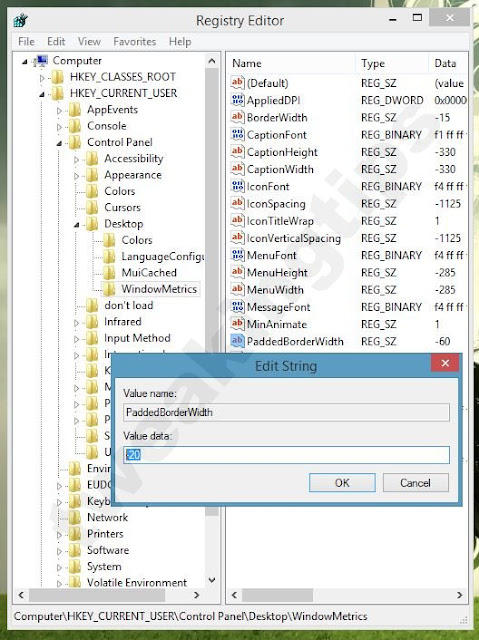
Default value for PaddedBorderWidth is -60. I recommend -20 if you want thinner borders. You can customize  this number for your needs.
  • Restart your computer or Sign off from Windows to take effect.

What is GodMode Folder and What Does It Do? Windows 8.1, Windows 8 and Windows 7.


It may be hard to find items in Windows 8 (8.1) due limited and hidden functions. You can access to all settings in just one folder with this little trick. 


  • Create a new Folder anywhere you want (Preferably Desktop)
  • Rename folder to GodMode.{ED7BA470-8E54-465E-825C-99712043E01C}
  • This is a great way to deal with Windows 8's bloated interface and limited UI. This is basically Control Panel list. But you can use search feature from right upper corner of the Window find any settings you ever need.